27. Exercise: Show When Charging
Show When Charging
Show When Charging
In this exercise you'll make the plug icon change from pink to grey when the app is in the foreground when you plug and unplug the device. Debugging plugging and unplugging the device can be hard on an emulator or live phone. Because of this, you can use the Android Debug Bridge to simulate the phone being plugged and unplugged without actually doing the plugging and unplugging. This is described below.
Note: At the end of this exercise your Hydration Reminder app will contain a small bug - if the phone is plugged in or unplugged when the app is not open, the UI will not update. This is because the dynamic broadcast receiver only receives events when the app is in the foreground. We'll be fixing this in the next exercise.
Setup ADB
The Android Debug Bridge, or adb as it is affectionately called, is a command line tool. This means that you should be comfortable working in a terminal or shell to use this program. We touched on it briefly in the first lesson. The adb program is stored in your android SDK folder in a subfolder called platform-tools. You can find where your SDK is by going to the SDK manager and looking at the SDK location, as shown below:
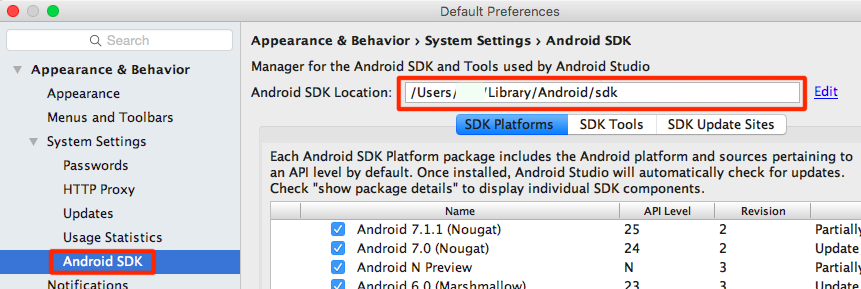
Once you have the sdk location, you can use adb by typing:
<YOUR SDK LOCATION>/platform-tools/adbIf you've added commands to your $PATH before, adb is a great one to add.
Helpful adb Commands
To simulate the phone being unplugged from usb charging you can use:
adb shell dumpsys battery set usb 0or if you're on a device Android 6.0 or higher you can use:
adb shell dumpsys battery unplugTo "plug" the phone back in, just reset it's charging status using:
adb shell dumpsys battery resetExercise Code
SOLUTION:
- Create the `showCharging` method which switches the plug icon between grey and pink.
- Create an intent filter that is triggered when the device is charging or not charging.
- Create a broadcast receiver called `mChargingReceiver` that updates the UI to pink if it was triggered because the phone was charging and grey otherwise
- Create and register this broadcast receiver with the intent filter
- Cleanup the `BroadcastReceiver` in `onPause`